Getting Started
Welcome to your journey with Digital Profit Stack AI! In this training module, I’m going to walk you through the installation process, step by step. You’ll learn everything you need to know to get your store up and running smoothly and efficiently. Whether you’re a tech newbie or a seasoned pro, I’ve got you covered with clear, easy-to-follow instructions.
Overview
On the download page, located just below the training link, you’ll find all the necessary download and access links for the files and materials included in the product. After you’ve navigated through the training and have a solid understanding of the system, you can return to this page to download your files. This ensures you have everything you need to successfully launch and manage your website.

This system provides you ready-to-deploy WordPress sites, delivered as a WordPress backup file, compatible with WPVivid Backup – a popular backup plugin with nearly 1 million of active users.
Installing with WPVivid Backup
Note: Please ensure you’re installing Digital Profit Stack AI on a fresh or clean WordPress site. Installing from the backup file will overwrite existing content, including blog posts. If you have an existing site with content, consider backing it up or installing Digital Profit Stack AI on a separate WordPress instance.
To install the store using WPVivid Backup Plugin, follow these steps:
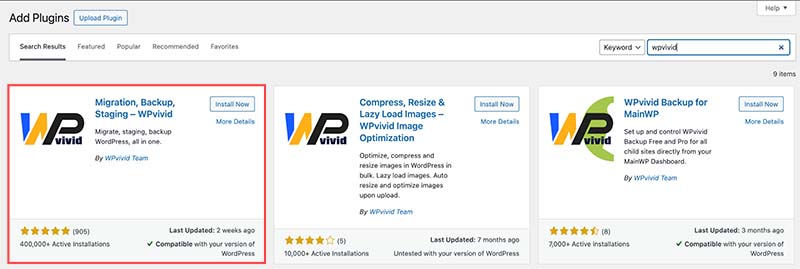
– Navigate to the WordPress Dashboard, go to ‘Plugins‘, and then click on ‘Add New‘.
– In the plugin search bar, type ‘WPVivid‘ or ‘WPVivid Backup.
– Find the plugin in the search results, click ‘Install‘, and then ‘Activate‘ it.
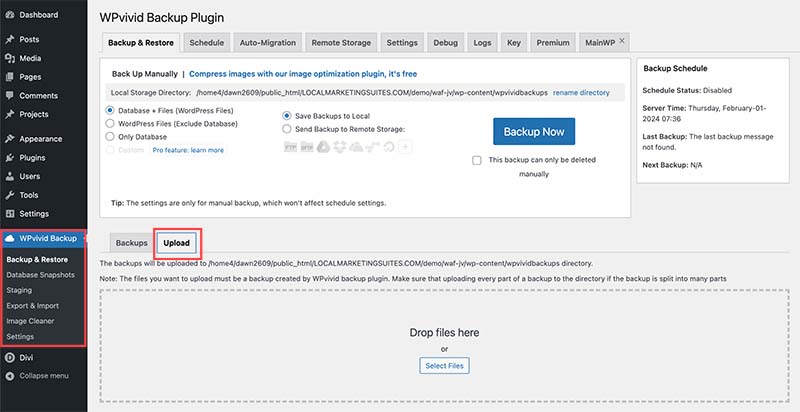
– Navigate to ‘WPVivid Backup > Backup & Restore‘ in your WordPress dashboard, then click on ‘Upload‘.
– Browse your computer for the import file you downloaded from the download page, select it, and start the import process.
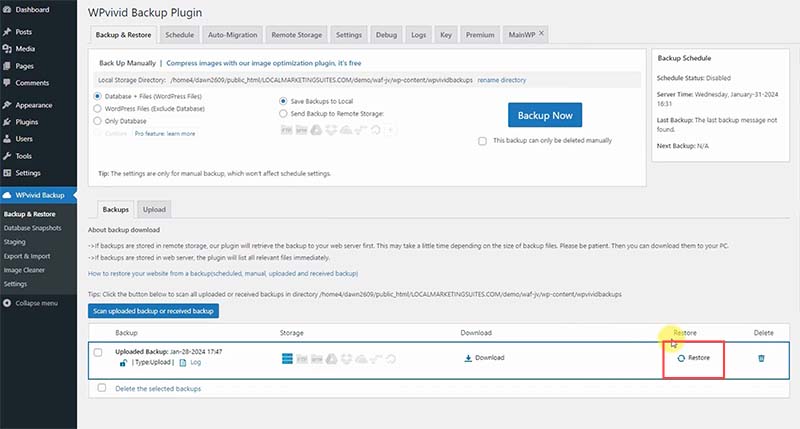
– After uploading the file, click ‘Restore’ to proceed with the backup.
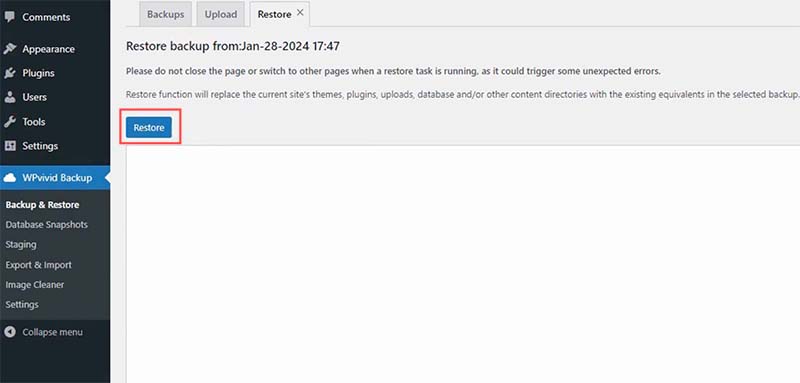
– When the installation process is complete, you will be redirected to the WordPress login page. You will have to use the credentials below to login:
Username: profitstackadmin
Password: 4W3s0m34If0rPr0fj7s

– After you log back into your WordPress site, the first action you should take is to navigate to ‘Dashboard > Quick Start’ and follow the instruction there.

Built-in Tutorial
Digital Profit Stack AI comes with a built-in tutorial section. After you successfully install the site and log in to the admin dashboard, you can click ‘Tutorial’ on the bottom left to access the built-in tutorials that shows you how to work with the site.
